POS software
POS software for retail shops
With Rivoo POS software, cashiers add items by scanner, from the scales or with a tap on the screen. Each sale updates stock at once and shows up in your reports.
Sell by barcode, weight, IMEI or m² Mixed payments and returns from the receipt In the browser: PC or touchscreen till Demo with no sign-up
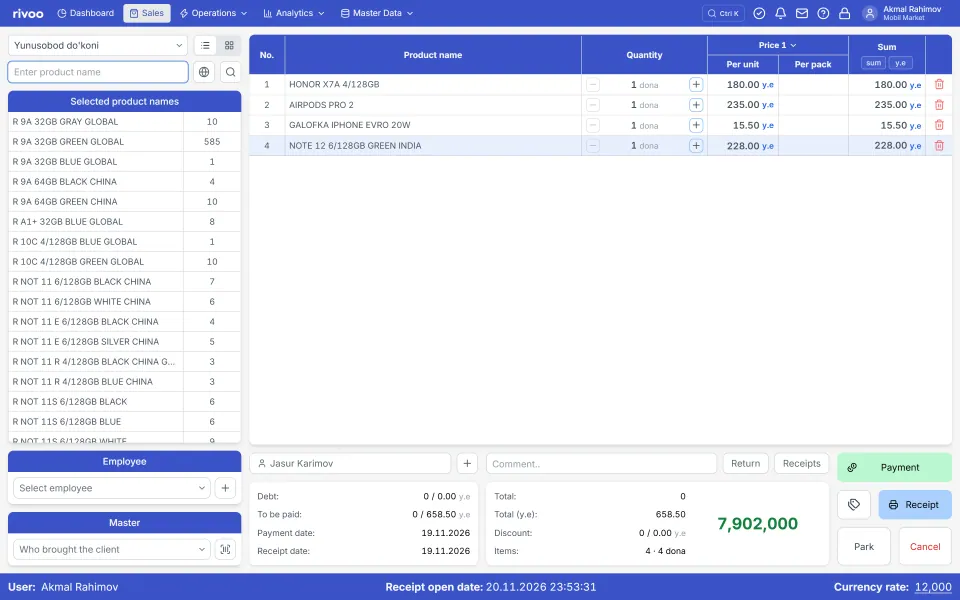
POS software that adds items fast
The cashier adds items with a scanner, from the scales or with a button on the screen. Rivoo reads the barcode the scales print and puts the weight on the receipt. You sell phones by IMEI and tiles by the m².
Barcode scanner and scales Selling by IMEI and by the m² Touch mode with an on-screen number pad F-keys: payment, discount, park the receipt
The queue keeps moving, returns are easy
If a customer steps away to fetch something, park the receipt and serve the next person. Turn on returns by receipt, and the cashier picks the item from the customer's receipt, so the quantity and price can't exceed what was sold. A phone with an IMEI can only be returned by the customer who bought it.
Parked receipts Returns from the customer's receipt Protection against selling out-of-stock items
Any payment: cash, foreign currency, card, Click and Payme
A customer can pay for one purchase several ways, for example part in cash and the rest by card or Click. Items in so'm and in foreign currency go on the same receipt, and Rivoo works out the change. Foreign-currency accounting comes with the Plus plan.
Mixed payment: cash, foreign currency, card, Click and Payme So'm and foreign-currency items on one receipt Your own payment methods Cashback and promo codes
Receipts that look like your shop
Print receipts on a 58 or 80 mm printer, or on A4 paper when you need to. Add your logo, your own text and a QR code, and give each branch its own design. A customer linked to your Telegram bot gets a message about the purchase.
58 mm, 80 mm and A4 receipts Logo, your own text and a QR code A separate design for each branch Price-tag printing
The till and the cashiers, under control
Each cashier sees only the sections they're allowed to. Rivoo records who changed a receipt and when. At the end of the day you check the daily report (Z) and the cash analysis, and you can follow sales in the phone app too.
Roles and permissions Automatic screen lock Change log Day close and daily report (Z)
Pricing
Which plan do I need?
Lite is free: 1 user, 1 warehouse, up to 150 products, 300 documents a month (sales, goods-in and so on) and 30 customers and suppliers in total. Paid plans start at 179 000 so'm a month. Credit sales, foreign-currency accounting and several price types come with Plus (339 000 so'm a month).
Frequently asked questions
What hardware do I need for the POS software?
An ordinary PC or a touchscreen till is enough. Rivoo runs in the browser and works with a barcode scanner, scales that print weight barcodes and a 58 or 80 mm receipt printer. You can also print A4 receipts and price tags.
How do I get started?
In three steps. First look around the demo; no sign-up needed. Then upload your products with the Excel template and enter opening stock and debts on the “Getting started” page — we can do it for you if you need.
How much does the POS software cost?
Lite is free, and paid plans start at 179 000 so'm a month. The monthly price comes off your balance a little each day, and you top up with Click or Payme. Work out your exact price with the calculator on the home page.
Is it hard to train cashiers?
No. Touch mode has big buttons and an on-screen number pad, so cashiers work without a mouse. The main actions sit on F-keys, and a cashier sees only the sections they need.
Does it work for several shops or branches?
Yes. You get transfers between warehouses, stock per warehouse and a receipt design per branch. More than one warehouse comes with the Plus plan.
How can I follow sales when I'm not in the shop?
With the Rivoo Business app on your phone. Install it from the App Store or Google Play. You see sales, stock and cash from anywhere.
More solutions
Try it today
Open the demo or message us on Telegram and we'll walk you through it.