Inventory
Inventory software that keeps stock accurate
Rivoo is inventory management software for shops and wholesalers in Uzbekistan. Record every delivery, sale and transfer, and Rivoo works out your stock and cost of goods.
Stock updates after every sale Cost of goods calculated automatically Stocktakes counted on a phone Separate stock for each warehouse
Stock you can trust, not a guess
Record every delivery, sale, return and write-off, with its date and the employee. Every change stays in the log, with who made it and when. Once you close a day, nothing up to that date can be changed.
Goods in and goods out Returns Transfers between warehouses Write-offs of damaged goods Day and period close
Cost and profit without spreadsheets
The cost of every product is calculated automatically. Add freight or customs to a delivery, and they go into the cost too. You see profit and margin in the reports.
Profit, margin and profitability Freight and customs in the cost Dead stock (in the mobile app) Top products and customers (ABC, Advanced module)
Stocktakes: count on a phone, apply on a computer
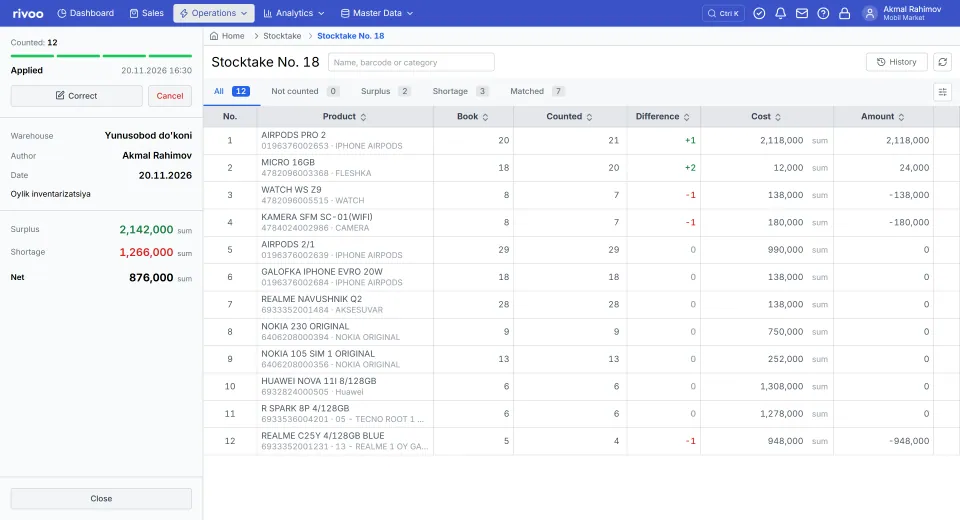
Staff count the goods in the Rivoo mobile app and save the count. In the web app you compare book and counted quantities, with surplus and shortage shown separately. Apply the stocktake and stock is corrected.
Surplus and shortage shown separately Uncounted items: keep or write off as 0 IMEI goods counted by scanning Cancel and correct after applying
Inventory management for every warehouse in one place
See each warehouse and shop's stock on its own, or all of them in one report. Move goods between warehouses with a transfer. You decide what happens when someone sells an item that isn't in stock.
Stock by Warehouse report Staff see only their warehouses Negative stock: allow, warn or block Rule for all, per warehouse or product
Get started fast with Excel import
Upload your products from an Excel template. Enter opening stock and debts once, under “Getting started”. Products sold in packs show their stock in boxes and pieces.
Excel import Price-tag printing Pieces and packs (say, a box of 12) Product bundles Phones tracked by IMEI
Pricing
Which plan you need
Lite is free: 1 user, 1 warehouse, up to 150 products, 300 documents a month and 30 customers and suppliers in total. Start is 179 000 so'm a month: 2 users and 1 warehouse, with no limit on products. Several warehouses start with Plus: 339 000 so'm a month with 2 warehouses included, and each extra warehouse is 66 000 so'm a month. ABC analysis is in the Advanced module: 220 000 so'm a month, from Start.
Frequently asked questions
How do I do a stocktake?
Count on a phone, apply on a computer. Staff count the goods in the Rivoo mobile app and save the count. You check the surplus and shortage in the web app and apply the stocktake, and stock is corrected automatically.
I have several warehouses or shops. Will it work?
Yes. Each warehouse keeps its own stock, and you move goods between them with a transfer. Several warehouses start with the Plus plan.
Can I import my products from Excel?
Yes. Upload products with the Excel template, and enter opening stock and debts under “Getting started”. We can help if you need it.
How is cost of goods calculated?
Automatically; you don't enter it by hand. Add freight or customs to a delivery, and they go into the cost too. You see profit and margin in the reports.
Can employees change stock levels?
Only within the rights you give them. Every change to a document stays in the log, with who made it and when. Only someone with the right permission can reopen a closed day for corrections, and that is logged too.
What happens if someone sells an item that isn't in stock?
You choose: allow it, warn and ask for approval, or block the sale. Set the rule for the whole business, per warehouse or per product. Such cases show up in the Negative Stock Events report.
More solutions
Try it today
Open the demo or message us on Telegram and we'll walk you through it.