New: delivery board and financial reports

Run your business
from one app

Sales, stock, cash and reports in one place. Rivoo is built for shops and wholesalers, and you can try it without signing up.

  • In Uzbek, Russian and English
  • On computers, touchscreen tills and phones
  • Accounting in so'm and foreign currency
One sale in Rivoo: the till rings it up, the dashboard shows it straight away, and warehouse stock drops by the amount sold.

Who it's for

For any business that sells

Rivoo handles what's specific to each trade.

Modules

Everything your business runs on

The modules are connected: a sale updates stock, and stock updates the reports, automatically.

  • Sales (POS)

    Barcodes, scales, IMEI, touch mode and 58/80 mm receipts.

    Learn more
    • EAN-13
    • IMEI
    • kg
    • m²
    • 58 · 80 · A4
  • Warehouse

    Goods in, goods out, transfers, stocktakes and multiple warehouses.

    Learn more
  • Cash & finance

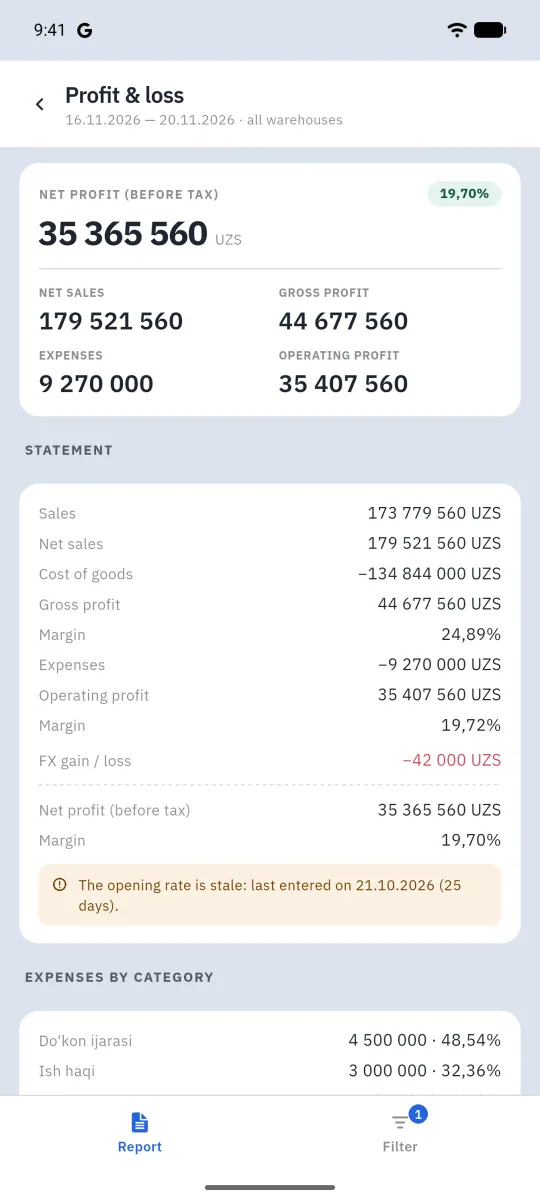
    Cash analysis, expenses, cash flow, P&L, debts and reconciliation acts.

  • Analytics

    Profit, margin, stock turnover, ABC analysis by customer and product, and Z-reports, in real time.

  • Services & orders

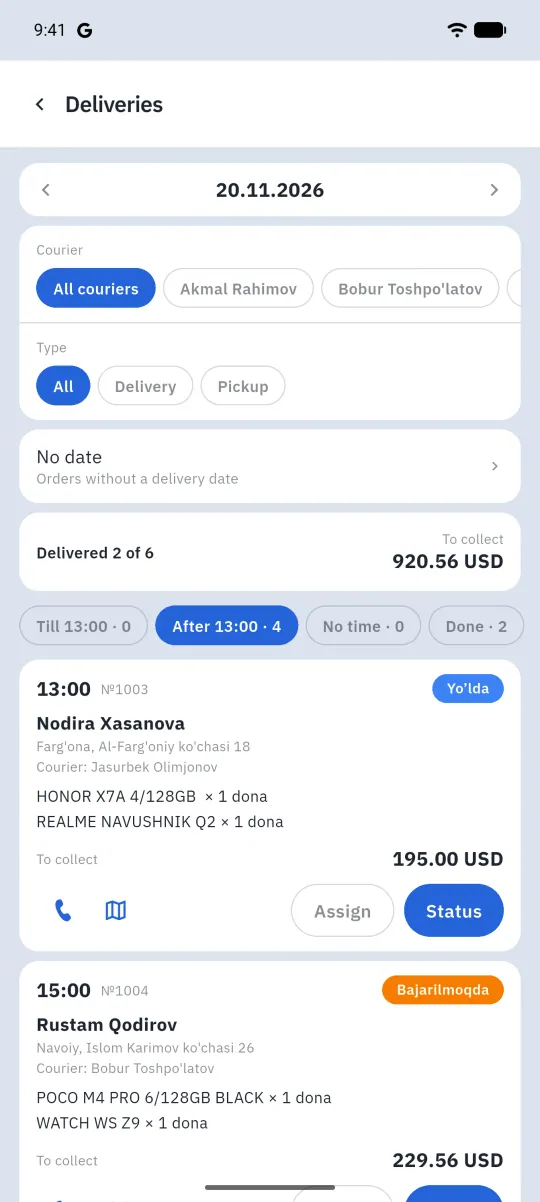
    Orders and a delivery board.

  • Customers & Telegram

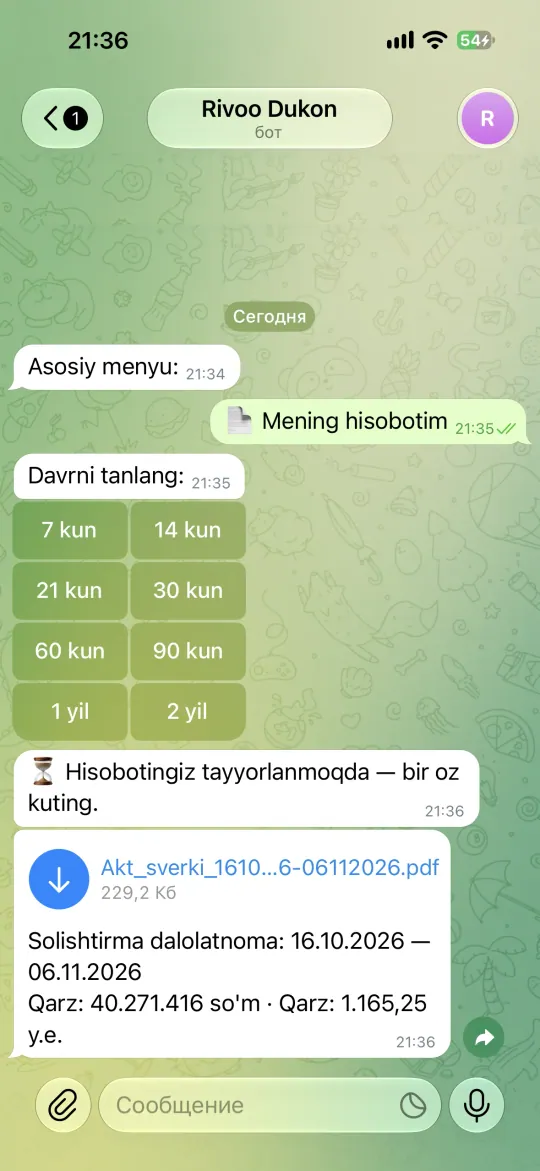
    Cashback, promo codes, tradesman bonuses and a Telegram bot.

Features

01 · Sales (POS)

No queue at the till

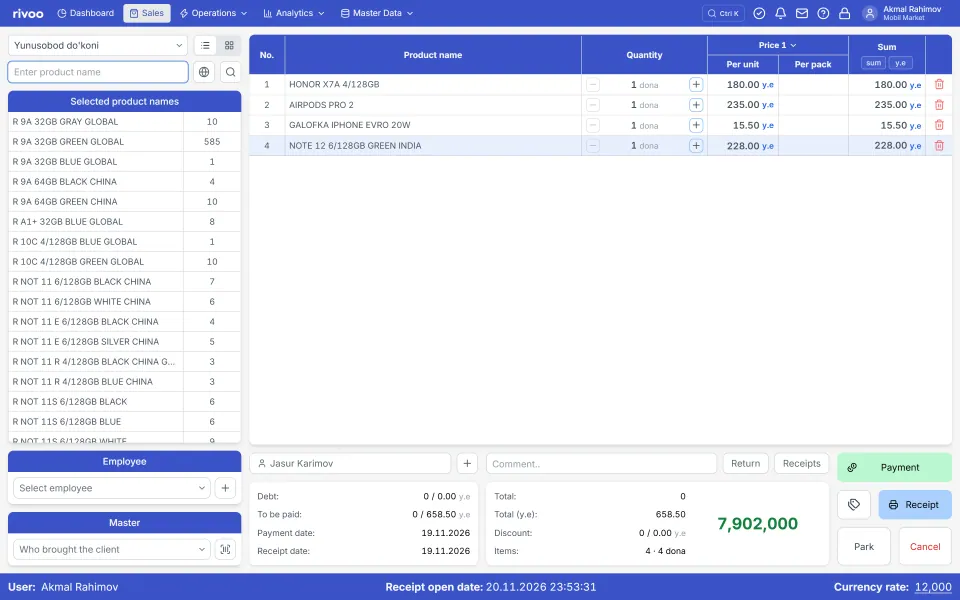
Scanner, scales or touch screen: a receipt closes in seconds. Returns take one click from the customer's earlier receipt.

  • Sell by barcode, weight, IMEI or m²
  • Touch mode for 15-inch touchscreen tills
  • Parked receipts
  • So'm and foreign-currency sales on one receipt
  • Mixed payment: cash, foreign currency, card, Click and Payme
  • 58 mm, 80 mm and A4 receipt designs
Rivoo: Sales (POS) — No queue at the till

02 · Warehouse

Know where every item is

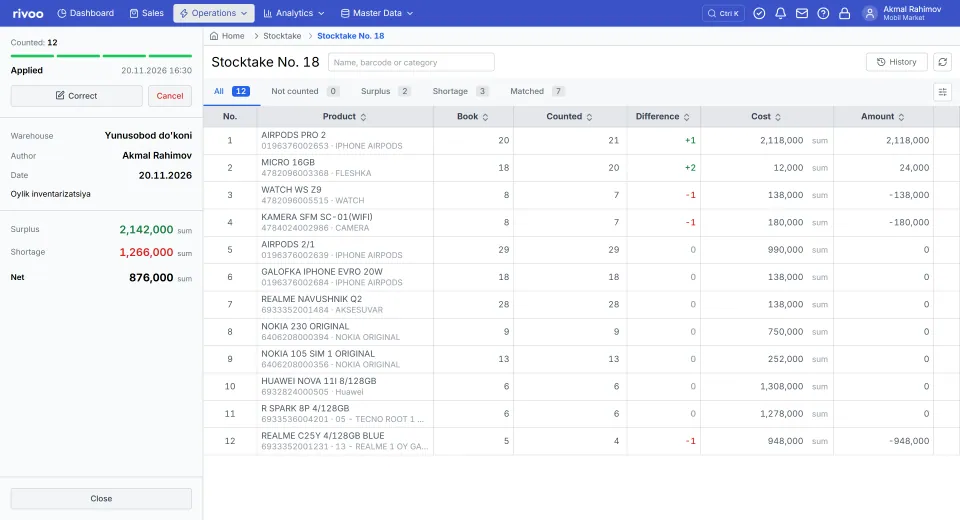
Every movement, from goods in to write-off, is a document, and cost of goods is calculated automatically.

  • Goods in and out, returns, transfers, write-offs
  • Stocktake list and counting sheet
  • Stock by warehouse and branch
  • Excel import and price-tag printing
Rivoo: Warehouse — Know where every item is

03 · Analytics

See your profit in real time

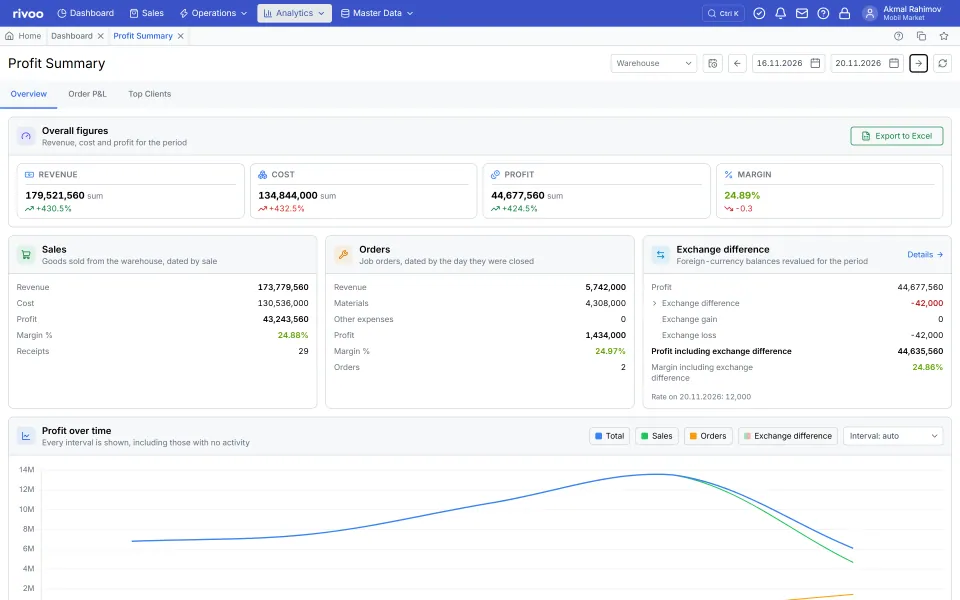
Which products make money and which sit on the shelf: it's in the reports the moment a sale goes through.

  • Profit, margin and return on stock (GMROI)
  • Profit and loss (P&L), cash flow, currency position
  • Daily Z-report and cash analysis
  • Sales by staff member and by customer
  • ABC-XYZ report by product and customer
  • Customers you are at risk of losing
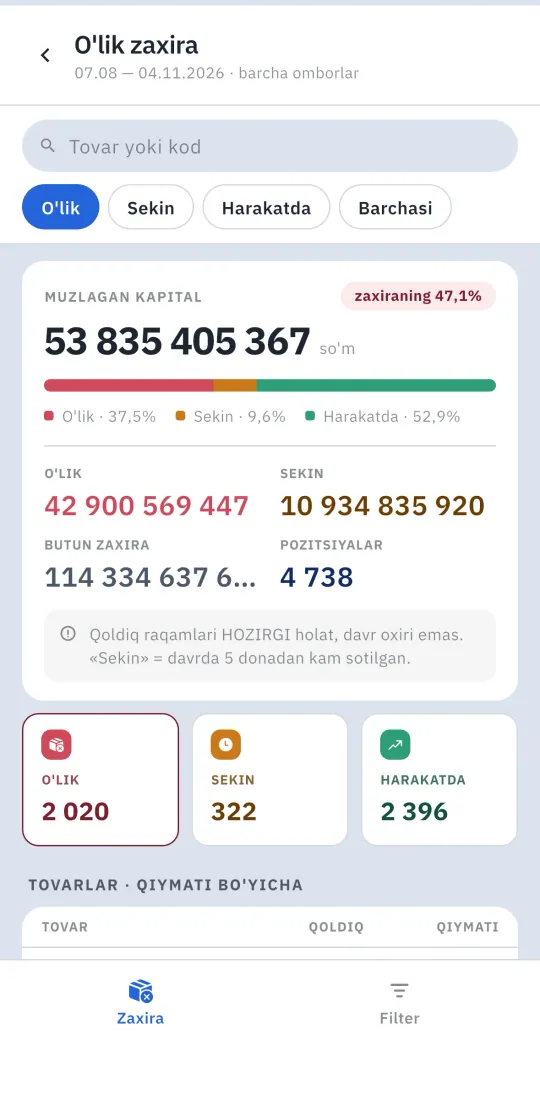
  • Dead stock
Rivoo: Analytics — See your profit in real time

04 · Orders & delivery

From order to doorstep

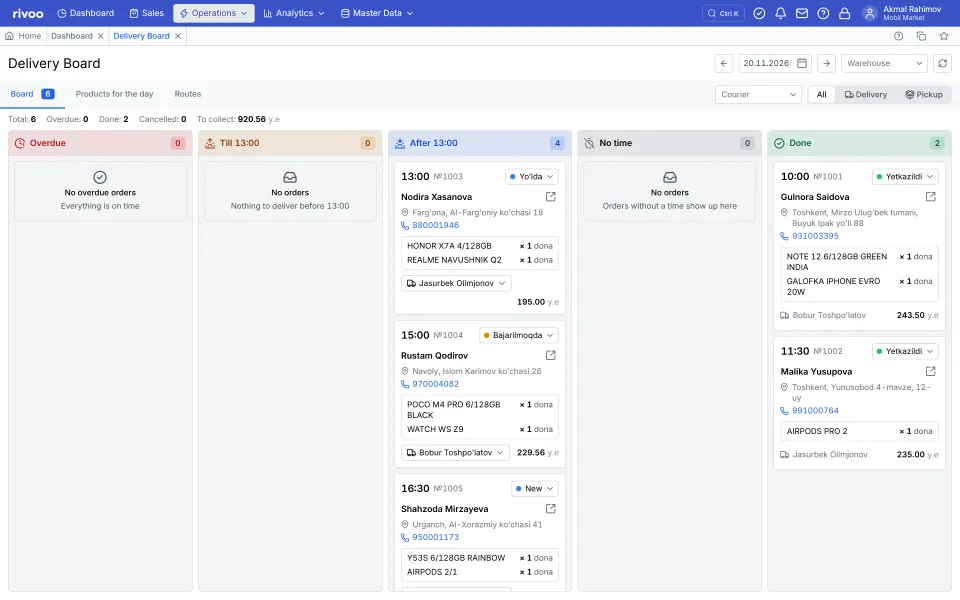
The day's orders on one board: assign a courier, print the route sheet and track payment.

  • Order and task lists
  • Five-column delivery board
  • A route sheet for each courier
  • Order payments, including bulk payment
Rivoo: Orders & delivery — From order to doorstep

What's new

Rivoo improves every month

New features arrive automatically. There's nothing to install.

All updates
  • November 2026

    Home page and quick actions

    F-keys for cashiers: new sale, return, goods in and more.

  • November 2026

    Cash analysis

    Cash on hand, comparison with the last period, payment methods.

  • November 2026

    Stock by warehouse

    Every warehouse's stock in one report.

  • October 2026

    Delivery board

    Courier assignment and route sheets.

  • October 2026

    Financial reports

    Profit and loss, cash flow, exchange differences.

  • October 2026

    Stocktake and day close

    Counting sheets, and locking a closed day's documents.

Telegram

Reach your customers on Telegram

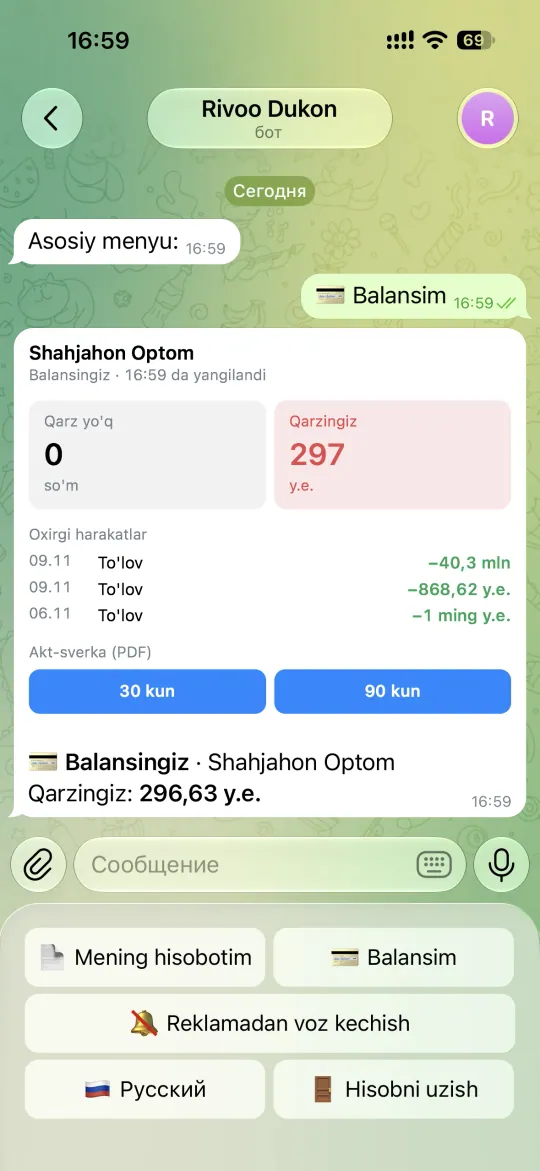
Each business connects its own bot. Customers join with one tap on a link.

  • Notifications for purchases, payments and orders
  • Debt balance and reconciliation act on request
  • Cashback balance and birthday greetings
  • Broadcasts to all your customers (Premium module)
Telegram: Your shop's bot

Devices

Whatever screen you work on

Rivoo runs in the browser and installs as an app. Updates are automatic.

Rivoo: Phone
Rivoo: Phone
Rivoo: Phone
  • Desktop

    Large tables, hotkeys and a command palette. Built for 2K screens too.

  • Touchscreen till

    Big buttons and an on-screen numpad: a till with no mouse.

  • Phone

    Keep an eye on sales, stock and cash from anywhere.

  • Uzbek (Latin, Cyrillic), Russian, English
  • So'm and foreign currency, with rate history
  • Light and dark theme
  • Automatic updates

Analytics on your phone

Answers about your business, in your pocket

The app shows which products earn, which ones freeze your cash, and which customers bring in the revenue.

App StoreGoogle Play
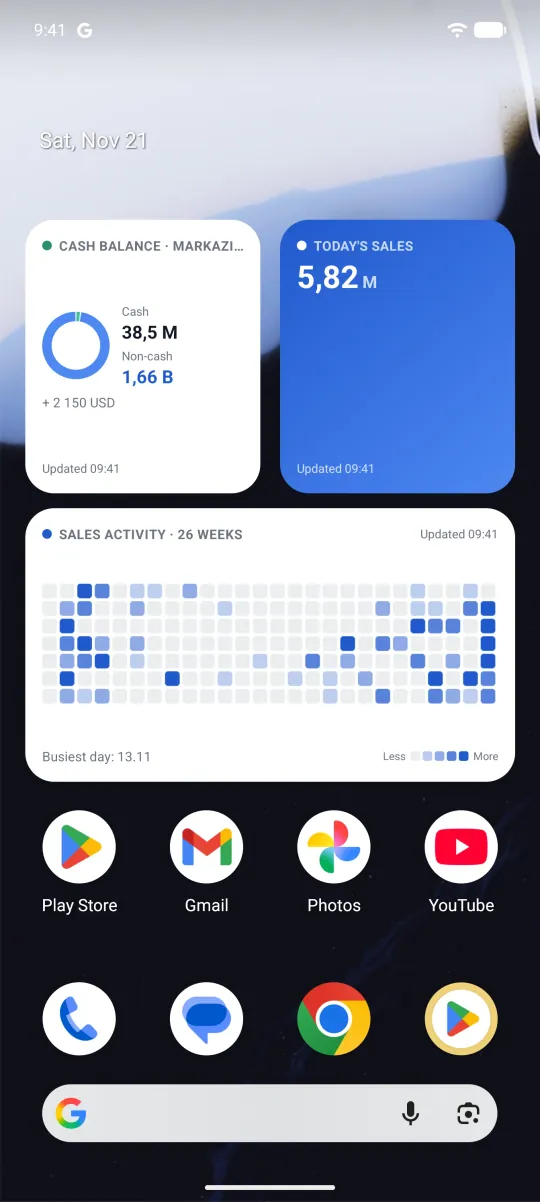
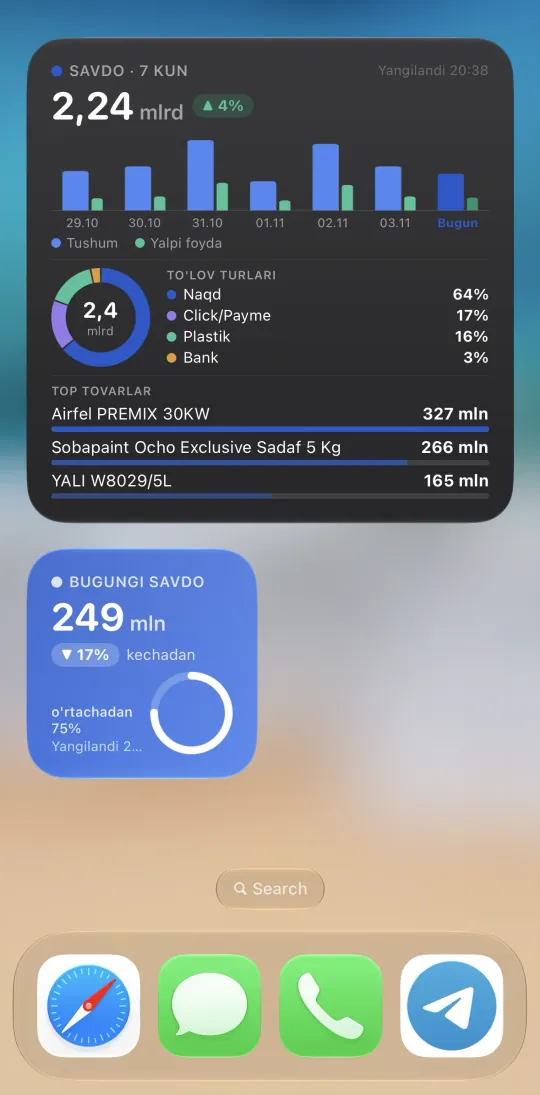
Rivoo: iPhone widgets
iPhone widgetsWeekly sales, payment types and top products without opening the app.
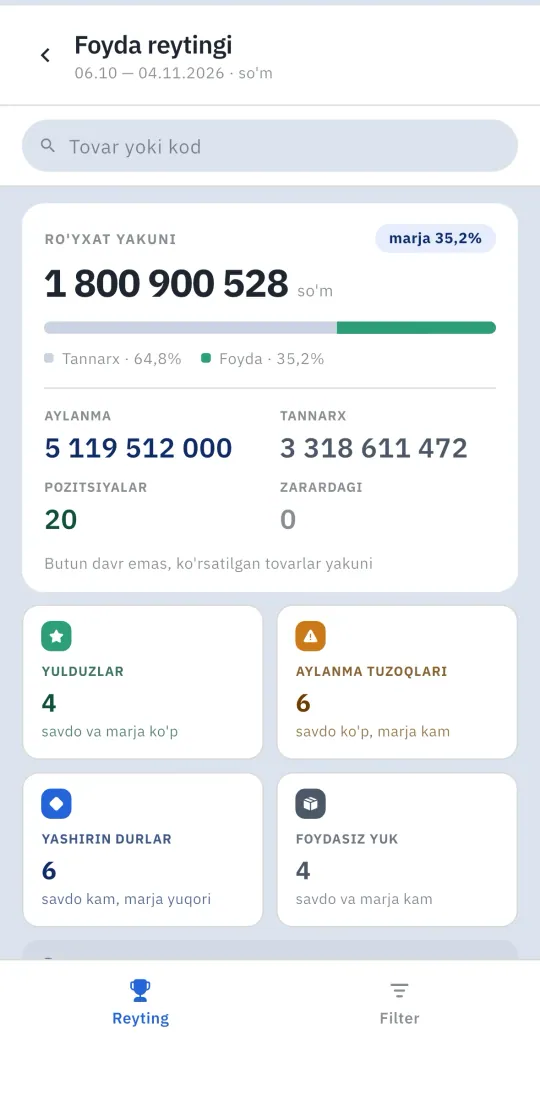
Rivoo: Profit rating
Profit ratingSorts products into 4 groups by profit and turnover, from stars to dead weight.
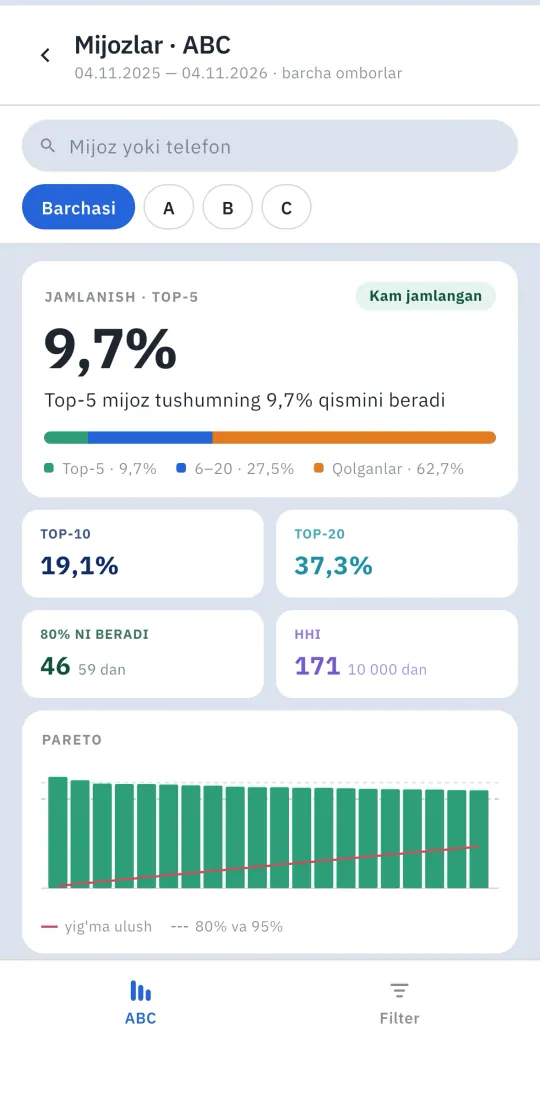
Rivoo: Customer ABC
Customer ABCHow much of your revenue comes from the top customers, with a Pareto chart.
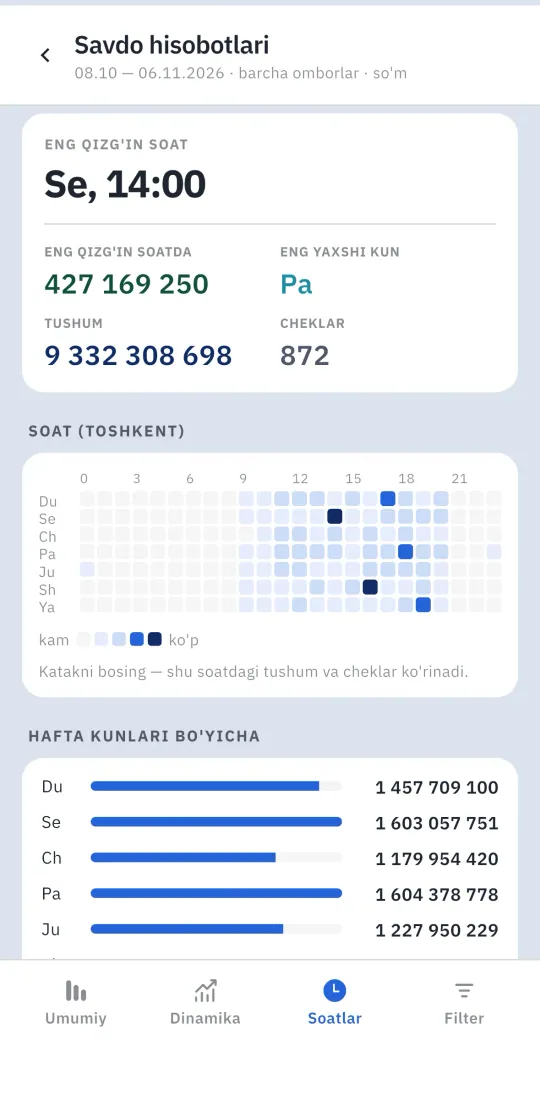
Rivoo: Busiest hours
Busiest hoursWhich days and hours sell the most, so you can plan shifts.
Rivoo: Dead stock
Dead stockHow much cash is frozen in products that are not selling.

Screenshots are in Uzbek.

Control

Your business, under control

Who did what, when, and in which document: it's all recorded.

  • Roles and permissions

    Each employee sees only the sections they need.

  • Change log

    Every change to a document, with its author and time.

  • Day and period close

    No one can change a closed day's documents.

  • Auto-lock

    Leave the till unattended and the screen locks itself.

  • Negative stock control

    Sell something that isn't in stock and the system flags it.

  • In the cloud

    Your data lives on the server; sign in from any device.

Getting started

Up and running in three steps

  1. Look around the demo

    Try the system on sample data, no sign-up needed.

  2. We set it up

    We import your products from Excel and enter opening stock and debts.

  3. Start selling

    Open the till; stock and reports update themselves.

Pricing

Tick what you need and see the price right away

Plans are priced per month and charged daily from your balance. You pay only for the modules and add-ons you switch on.

Plan

Pick a plan and the settings adjust to it. ★ best value; greyed out: doesn't fit your settings.

Your business

Users
7
Warehouses and shops
2

Features and modules

Credit sales, foreign-currency accounting, several price typesIncluded in Plus
Advanced220 000 so'm / month
Premium132 000 so'm / month
Personal manager220 000 so'm / month

Prices effective from 01.11.2026

PlanPrice
Free
179 000so'm / month
339 000so'm / month
659 000so'm / month
879 000so'm / month
from 1 759 000so'm / month

How billing works

  • Charged daily

    Each day your balance pays for the plan plus any modules and add-ons switched on that day.

  • Change plan any day

    The new price applies from the next day.

  • Reminders before it runs out

    You get a message in Telegram and in the app when 7, 3 and 1 days are left.

  • Your data stays safe

    Everything keeps working for 3 more days. After that you can't add new documents, but viewing and export stay open.

  • No limit on documents or turnover

    Paid plans don't cap the number of documents or your monthly sales (fair use).

  • Restore what was deleted

    Deleted records are kept for 90 days. Within 7 days you can restore them free on any plan.

Full breakdown
Best value
Plus
A shop with a back store, 3–5 staff
427 000so'm / month
14 038 so'm / day
Plus planIncluded: users 5, warehouses 2
339 000 so'm
Extra users2 × 44 000 so'm
88 000 so'm
Setup and installation
agreed with a manager
  • To start, top up at least 140 380 so'mLasts 10 days
Talk to a manager
Top up with:ClickPayme

FAQ

Frequently asked questions

Didn't find your answer?

Message us on Telegram or call. We'll help.

Rivoo is a cloud ERP and POS system for retail and wholesale. Sales, stock, cash, orders and reports in one place, in the browser.

Click “Try the demo”, then choose “Demo Base” on the sign-in page. No sign-up needed.

You pick a plan: Lite is free, and paid plans start at 179 000 so'm a month. The monthly price comes off your balance daily (monthly × 12 ÷ 365). Add modules, users or warehouses when you need them. You top up with Click or Payme.

Upload products with the Excel template, and enter opening stock and debts with the “Getting started” wizard. We can help if you need it.

Barcode scanners, scales that print weight barcodes, 58 and 80 mm receipt printers, A4 printers and price-tag printers.

Yes. Multiple warehouses and branches, transfers between them, stock per warehouse and a receipt design per branch.

Yes. Roles set permissions for every section and action. Every change is kept in a log, and closed days can't be edited.

The app works in Uzbek (Latin and Cyrillic), Russian and English. Each user picks their own.

Try it today

Open the demo or message us on Telegram and we'll walk you through it.